DIGITAL TRANSFORMATION PRO-TIPS | SEPTEMBER 2025
September 2nd, 2025 – Curtis Chow
Tip 1: Wrike PM Gantt Chart Feature
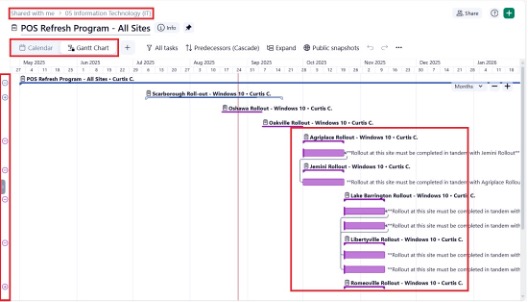
Step 1: On your Wrike, go to your Folder View. Ensure project subitems have due dates.
Step 2: Beside the Calendar feature, select the Gantt Chart feature.
Step 3: The existing red vertical line indicates today’s date. Expand projects by clicking on the “+” icon on the left side of the screen. Step 4: Simply drag lines from the left side of one subitem to another subitem to create dependencies.
CONFIDENTIAL – NOT FOR DISTRIBUTION 1
Please reach out to me directly for queries, suggestions, and feedback. Thank you!
Curtis Chow
Project Manager, Information Technology Canlan Ice Sports Corp. cchow@canlansports.com
CONFIDENTIAL – NOT FOR DISTRIBUTION 2